
A text diff of two JSON files tells you which lines changed. That's the wrong question. Reformat one file, or let a serializer write its keys in a different order, and every line differs while the data is identical. Change one value deep inside a minified file and the diff shows a single 30,000 character line. What you want is a structural diff: which keys, values and array items changed. Here's how to get one.
The fast answer
- Quick, in a terminal: sort and format both, then diff the text:
diff <(jq -S . a.json) <(jq -S . b.json). - A real structural diff:
jd a.json b.json, which reports paths, not lines. - In Python:
DeepDifffrom thedeepdiffpackage, withignore_order=Truewhen array order doesn't matter. - In VS Code: format both files first, then Select for Compare and Compare with Selected.
- On a phone: a JSON app with a structural diff, not a website you paste two documents into.
Why plain diff gets it wrong
Three kinds of difference look like changes to a text diff and aren't:
- Whitespace. One file is pretty-printed, the other minified. Every line differs.
- Key order.
{"a":1,"b":2}and{"b":2,"a":1}are the same object. JSON objects are unordered by definition, and different languages serialize them differently. - Number spelling.
1.0,1and1e0are the same number to most parsers, and different text.
And one kind of difference is a change but text diff handles badly: arrays. Insert an item at the top of a list of 500 records and a line diff reports 500 changes, because every item has moved down by one.
The jq shortcut
If you have jq, normalizing both files first fixes the whitespace and key order problems in one go:
diff <(jq -S . a.json) <(jq -S . b.json)
-S sorts keys, . pretty-prints. The diff you get back is now about data.
It still reports array insertions badly, and it still shows lines rather
than paths, but for config files and small API responses it's often enough.
On Windows without a Bash shell, write both to files and compare those:
jq -S . a.json > a.sorted.json
jq -S . b.json > b.sorted.json
fc a.sorted.json b.sorted.json
A structural diff with jd
jd is a small command-line tool made for exactly this. It compares the
parsed structure and reports each change as a path:
jd a.json b.json
@ ["user","email"]
- "[email protected]"
+ "[email protected]"
@ ["items",2]
+ {"sku":"B-17","qty":1}
Useful options:
-settreats arrays as unordered sets, so a reordered list isn't a change.-setkeys idpairs array items by theiridfield, so an edited record is reported as an edit rather than a removal and an addition.-f patchoutputs a standard JSON Patch (RFC 6902) you can apply elsewhere.
In Python
import json
from deepdiff import DeepDiff

a = json.load(open("a.json"))
b = json.load(open("b.json"))
print(DeepDiff(a, b, ignore_order=True))
The output groups changes by kind (values changed, items added, items
removed, type changes) with a path to each. ignore_order=True is what you
want for most lists of records. Leave it off when order is the data, such as
the steps of a pipeline.
In an editor
VS Code compares any two files side by side: right-click the first in the Explorer, Select for Compare, then right-click the second, Compare with Selected. It's a text diff, so format both with Shift+Alt+F first, and it helps to sort keys too (an extension, or the jq command above).
JetBrains IDEs have the same in Compare Files, with a setting to ignore whitespace.
If you're comparing two versions of a file in git, git diff has the same
weakness as plain diff. A consistent formatter on
commit stops most of the noise at the source.
Watch out for these
- IDs and timestamps that always change. An API response with a
requestIdorgeneratedAtfield differs every time. Delete those fields before comparing:jq -S 'del(.requestId, .generatedAt)' a.json. - Large integers. JavaScript-based tools round integers above 9,007,199,254,740,991, so two different 19-digit IDs can compare as equal. jq 1.7 and Python keep them exact.
- Invalid JSON. Most tools stop with a parse error. Fix it first; a trailing comma in one file is not a difference you want to hunt for.
- Online diff sites. Both documents are pasted into a page you can't inspect. Fine for sample data; not for anything with tokens or customer records.
On iPhone and iPad
Comparing on a phone usually means a response you've just fetched against a file you saved last week, or a config before and after a change. Smart Json diffs the open document against another file, the clipboard or a URL. The comparison is structural, so reformatting isn't reported as a change, and array items are paired by identity when they have one, so an edited record shows up as one edit. Changed subtrees are tinted in the graph view, which makes it quick to see where in a large document the changes are.
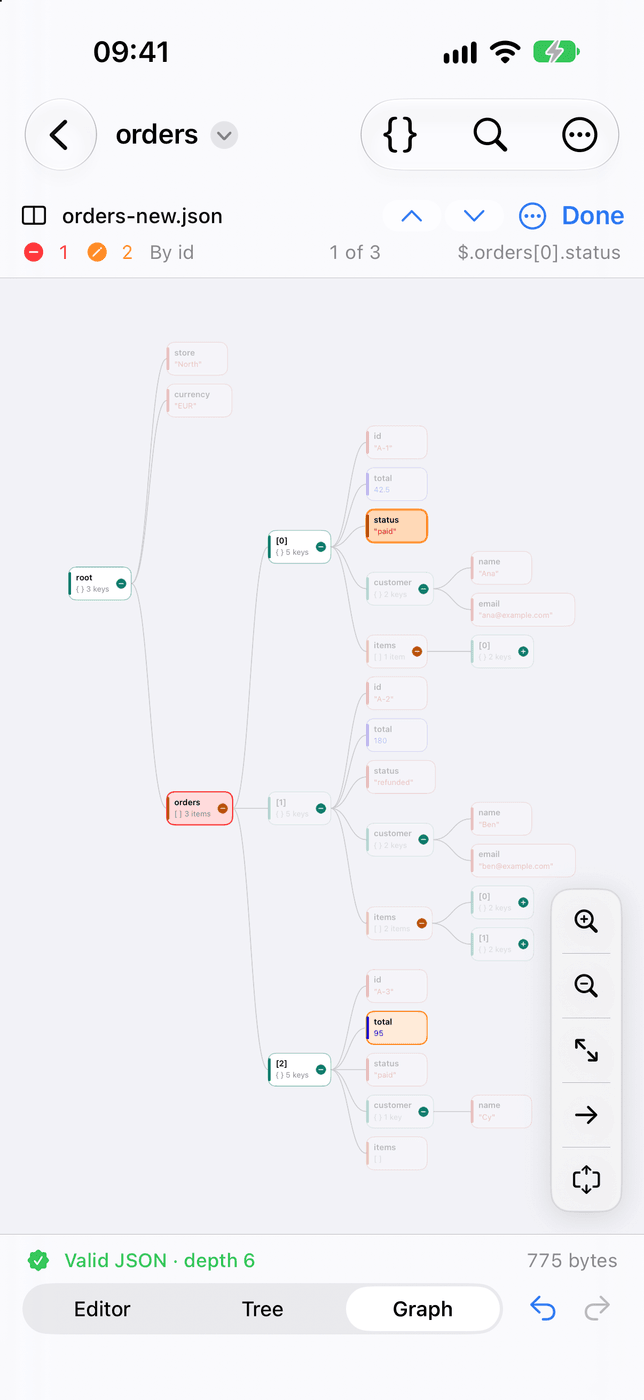

A structural diff on iPhone and iPad: against a file, the clipboard or a URL, with changes tinted in the tree and the graph. Offline.
What it doesFor comparing tabular data rather than nested documents, comparing two CSV files works differently, by matching rows on a key column.