

JSON Editor: Smart Json
One JSON document, three views that all edit.
- Editor, tree & graph
- Live JSONPath
- Structural diff
- Offline, no account
Why it exists
Most JSON apps on a phone are viewers wearing an editor's name: they pretty-print, they collapse, and that is the end of it. Smart Json starts from the view nobody else offers, a node-link graph you can tap to change a key, a type or a value, and then keeps it honest by making the text the single source of truth. Edit in any of the three views and the other two follow, because a view that can drift from the document is worse than no view at all.
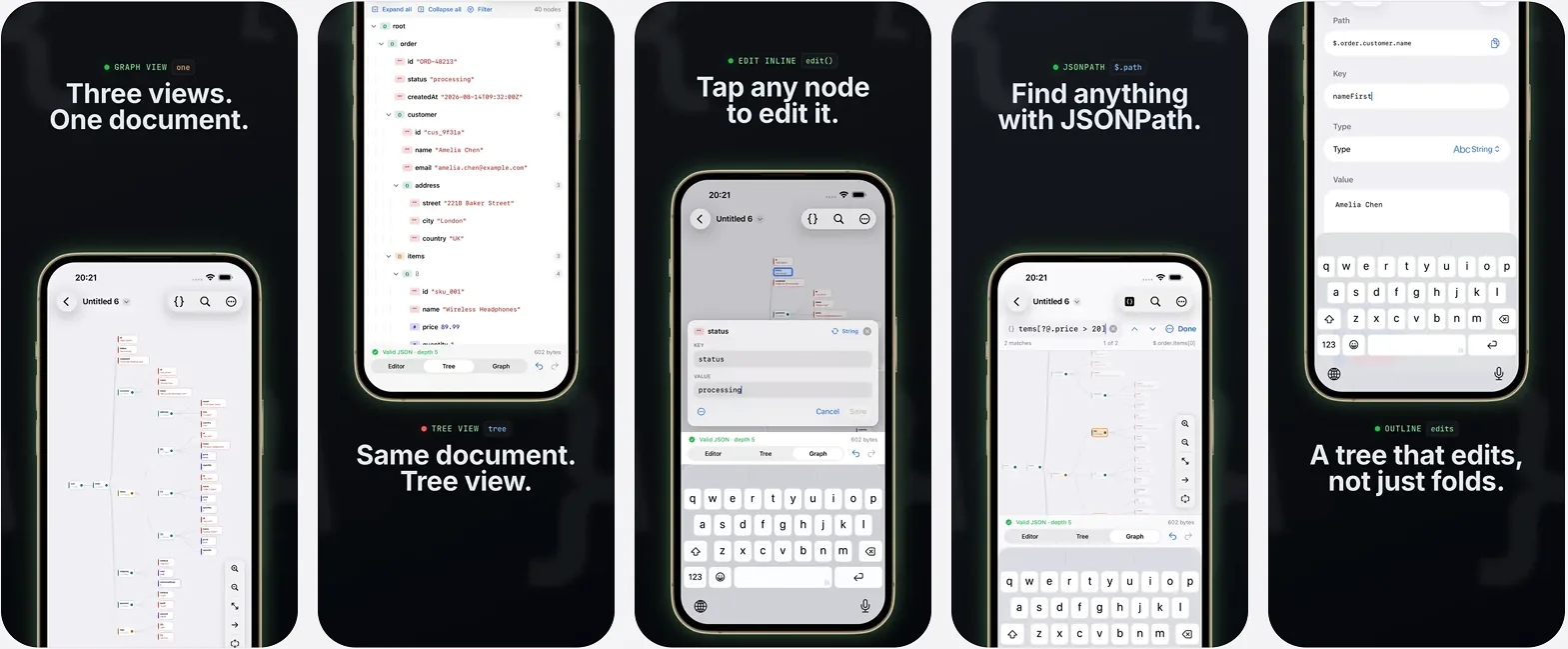
Three linked views, one source of truth
The same document is a syntax-highlighted editor, a collapsible tree and an interactive graph. All three edit. The text is authoritative, so tree and graph edits are re-serialized rather than tracked separately, and nothing drifts out of sync.
Editor
- Syntax highlighting that re-tokenizes only what you typed, so it stays fast.
- Line-number gutter, wrap and font size controls.
- A punctuation bar above the keyboard: braces, brackets, quotes, true, false, null, indent, undo and redo.
- Invalid JSON gets a plain-language banner naming the problem, its line and its column.
- Tap Go to jump the caret there, or Fix to repair comments, trailing commas, single quotes and unquoted keys.
Tree
- A collapsible outline with indent guides, type badges and child counts.
- Search across keys and values, filter by type.
- Edit any node in place: rename, change type, reorder, duplicate, add, delete.
Graph
- A tidy node-link diagram, left to right or top to bottom.
- Pinch to zoom, pan, tap a node to expand it, fit to screen.
- Tap a node to open an editor docked right underneath it: the graph edits as well as it browses.
- Expand all, expand to a depth, or expand one subtree.
- Export the graph as PNG or SVG.
Find what you need
- One find bar in every view, with match case and wrap-around in the editor.
- Structural search in the tree and graph, with scope and type filters, stepping through hits.
- JSONPath that evaluates live and tints its matches in the editor, the tree and the graph at once.
- A documented subset of RFC 9535, filter expressions included.
Compare and convert
- Diff the open document against a file, the clipboard or a URL.
- Structural, not textual: reformatting is not a change.
- Changed subtrees are tinted in the graph, and array elements are paired by identity when they have one.
- Preview your document as YAML, CSV, TOML or XML, each with a plain statement of what that format cannot carry.
Getting JSON in and out
- Open files from iCloud Drive and Files, with proper open, save and rename.
- Start a document from the clipboard or from a URL, sending your own headers on the request.
- A share extension accepts JSON from any app, and JSON5 files open too.
- Beautify, minify, sort keys, auto-fix, escape and unescape a JSON string literal.
- Undo and redo everything, with one history per document shared by every view.
Built right
Native SwiftUI for iPhone and iPad, with full keyboard support, light or dark. A hand-written parser preserves key order and keeps number literals exactly as written, so nothing is lost on a round trip. It works entirely offline: no account, no sign-in, no analytics, and no data leaves your device.
Questions
- Can I edit in the graph, or only look at it?
- You can edit. Tap a node and an editor docks right underneath it, where you can change the key, the type or the value, add a child or delete the node. Graph edits are re-serialized into the text, so the editor and tree stay in step.
- Do the three views ever get out of sync?
- No. The text is the single source of truth, and tree and graph edits are re-serialized back into it, so the other two views always reflect the same document.
- Does it support JSONPath?
- Yes. Type an expression and it evaluates live, tinting its matches in the editor, the tree and the graph at the same time. It implements a documented subset of RFC 9535, filter expressions included.
- What does the diff compare?
- Structure, not text. You can diff the open document against a file, the clipboard or a URL, and reformatting alone never registers as a change. Changed subtrees are tinted in the graph, and array elements are paired by identity when they have one.
- Which formats can it convert to?
- YAML, CSV, TOML and XML, each preview stating plainly what that format cannot carry. The graph also exports as PNG or SVG.
- What is free and what needs Pro?
- Every feature computes and shows you its result for free. Pro is for keeping that result: extracting JSONPath matches to a new document, query history and saved queries, text diff with patch export, and saving or sharing a conversion.
The other apps
 Video Trim, Flip, ReverseOne video in, five tools, one export.Read more
 Mind Map: Smart MindAI mind maps that never leave your device.Read more
 CSV Editor - Smart CSVOpens the CSV files other apps choke on.Read more
 CSV File Viewer - Smart CSVRead, query and chart any CSV. AI assistant included.Read more
 Habit Tracker: 30Day ChallengeAny goal, turned into a 30-day challenge.Read more