

Mind Map: Smart Mind
AI mind maps that never leave your device.
- AI generate & expand
- 8 layouts, 18 themes
- PDF, PNG, Markdown, OPML
- No ads, no account
Most mind mapping apps want an account before they will let you write anything down, and a subscription before they will let you get it back out. Smart Mind inverts that. It opens on a blank canvas, keeps every map on the device, and exports to six different formats. A thought you can't retrieve later was never really captured.
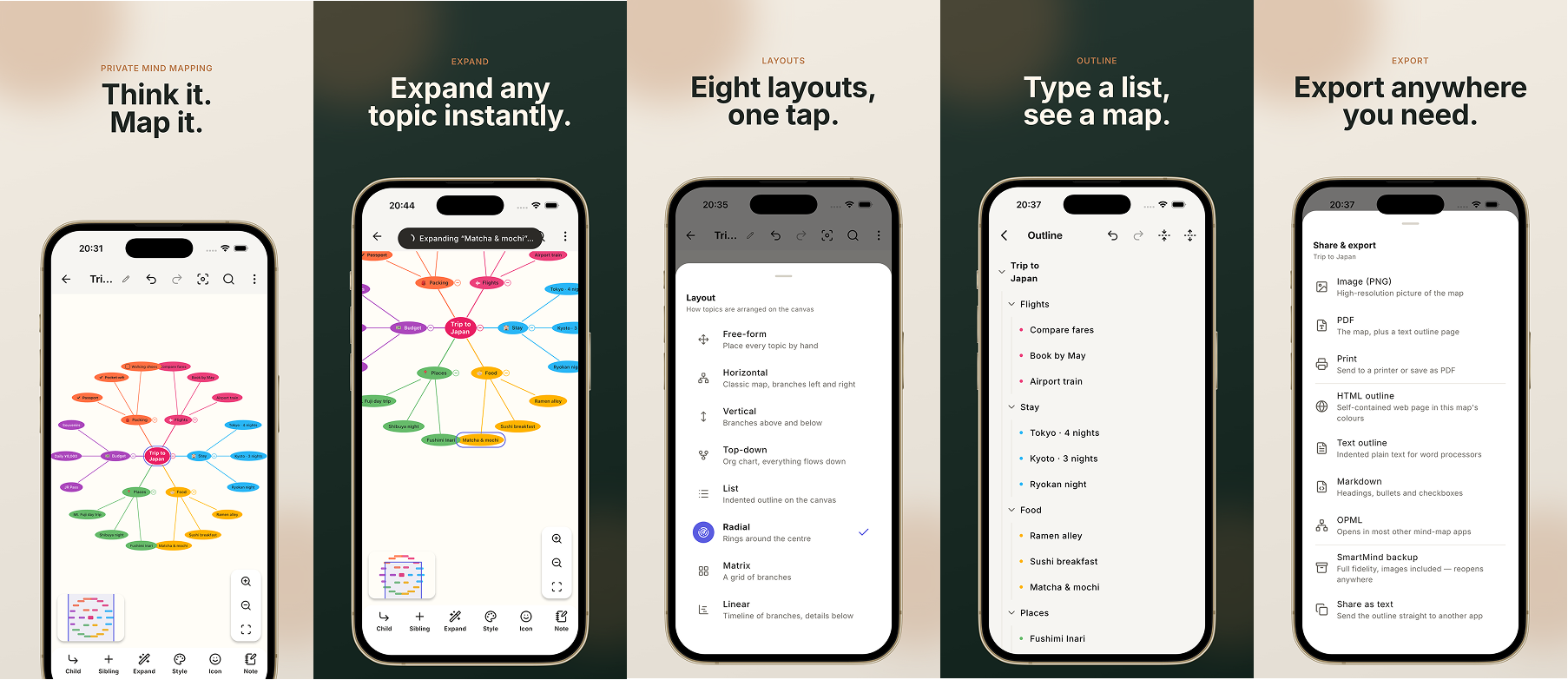
Start with AI, finish by hand
Describe what you're thinking about in one sentence and Smart Mind builds a structured map from it. Tap any topic to expand it into sub-topics. AI topics arrive as ordinary editable text: nothing is locked or watermarked, and undo works normally.
Built for real maps
- Unlimited topics on an unlimited canvas that grows with your thinking.
- Several mind maps side by side on one page.
- Drag and drop to re-parent a topic or re-order siblings.
- Checkboxes with progress that rolls up from the branch below.
- Auto-numbering, crosslinks between any two topics, labels and call-outs.
- Images from camera or gallery, notes on any topic, emoji and stock icons.
- Collapse, hide branches, autofocus one branch, branch and group borders.
- Editable outline view: type a list, see a map.
- Search in a map and across your library, organised into folders.
Layouts and style
Eight layouts: horizontal, vertical, top-down org chart, linear timeline, radial, matrix, list, and free-form. Eighteen built-in themes, eight of them dark. Style any topic (fill, text, border, shape, font) and any branch line's colour and pattern.
Take it anywhere
Export to PDF, PNG, HTML, Markdown, OPML or plain text outline. Print from the app. Present a map branch by branch as an animated slideshow. Back up everything to one file and restore it on another device. Importing is always free, so your maps are never trapped.
Privacy, plainly
No ads. No account. No analytics. No tracking. Your maps live on your device and are never uploaded, synced or read by anything.
Questions
- Does Smart Mind need an account?
- No. There is no account, no ads, no analytics and no tracking. Your maps live on your device and are never uploaded, synced or read by anything.
- Can I edit the topics the AI generates?
- Yes. AI topics arrive as ordinary editable text: nothing is locked or watermarked, and undo works normally. You can also tap any topic to expand it into sub-topics.
- What formats can I export to?
- PDF, PNG, HTML, Markdown, OPML or plain text outline, and you can print directly from the app. You can also back everything up to a single file and restore it on another device, and importing is always free.
- How many layouts and themes are there?
- Eight layouts (horizontal, vertical, top-down org chart, linear timeline, radial, matrix, list and free-form) and eighteen built-in themes, eight of which are dark.
- Can I put more than one map on the same page?
- Yes. Several mind maps can sit side by side on one page, on a canvas that grows with your thinking.
Guides
- Mind map vs concept map vs flowchartA mind map is a tree, a concept map is a graph with labelled links, a flowchart is a sequence. Which one you need depends on the question you are answering.
- How to plan a project with a mind mapA mind map is the right tool for the first two hours of a project and the wrong one for the rest. Here is how to scope, decompose and then hand over.
- How to turn a Markdown outline into a mind mapAny indented list is already a tree, so the conversion is a change of view. Here is how to write an outline that imports cleanly, and get one back out.
- How to use mind maps to studyBuilding a map helps; looking at one is re-reading. Here is how to make study maps you can test yourself against, and what to use flashcards for instead.
- How to turn meeting notes into a mind mapLinear notes bury what a meeting actually produced: the decisions, the open questions, who owes what. Here is a repeatable way to restructure them into a map.
- Free AI mind map generators, compared (2026 guide)Most free AI mind map tools cap you at three maps, watermark the export, or want an account first. Here is what each one actually gives away, and where it stops.
The other apps
 JSON Editor: Smart JsonOne JSON document, three views that all edit.Read more
 CSV Editor - Smart CSVOpens the CSV files other apps choke on.Read more
 CSV File Viewer - Smart CSVRead, query and chart any CSV. AI assistant included.Read more
 Habit Tracker: 30Day ChallengeAny goal, turned into a 30-day challenge.Read more