
JSON is strict in a way that feels petty until you know the rules. No trailing commas. Double quotes only. No comments. Keys must be quoted. Break any one of them, anywhere, and the whole document is rejected with a message that points at a character position and rarely says what's wrong.
This page maps the error messages to their causes, then the causes to their fixes.
The fast answer
- Find the position. Every parser reports a line and column, or a character offset. Go there; the mistake is at that spot or just before it.
- Look for the usual five: a trailing comma, single quotes, an unquoted key, a comment, or a missing comma between two items.
- If the error is at position 0 or line 1, column 1, the problem isn't the JSON. You received something else: an HTML error page, an empty response, or a byte-order mark.
To get a precise location on any machine:
python3 -m json.tool broken.json
jq . broken.json
Reading the error message
The same mistake reads differently in each language. Find yours, then the cause:
| Message (abbreviated) | Where you'll see it | Usual cause |
|---|---|---|
Unexpected token '<', "<!DOCTYPE"... is not valid JSON | JavaScript | You got an HTML page, not JSON. See below |
Unexpected end of JSON input | JavaScript | Empty response, or the file was cut off |
Expected double-quoted property name | JavaScript | Trailing comma before }, or an unquoted or single-quoted key |
Unexpected non-whitespace character after JSON | JavaScript | Two documents back to back, or junk after the closing brace |
Bad control character in string literal | JavaScript | A raw tab or newline inside a string |
Expecting value: line 1 column 1 (char 0) | Python | Empty input, or not JSON at all |
Expecting property name enclosed in double quotes | Python | Trailing comma, single quotes, or unquoted key |
Expecting ',' delimiter | Python | A missing comma between two items or members |
Extra data | Python | More than one document in the file (often NDJSON) |
Invalid control character | Python | A raw tab or newline inside a string |
Unexpected UTF-8 BOM | Python | Invisible byte-order mark at the start of the file |
The causes, one by one
Trailing comma
{ "name": "Ada", "role": "admin", }
Allowed in JavaScript code, forbidden in JSON. The parser reaches } while
expecting another key. Delete the last comma. Hand-edited config files and
code that builds JSON by string concatenation are the usual sources.
Single quotes
{ 'name': 'Ada' }
JSON strings use double quotes, always. This usually comes from a Python
dict printed with print() instead of json.dumps(). The real fix is in
the code that produced it: serialise with a JSON library, not with string
formatting.
Unquoted keys
{ name: "Ada" }
Valid JavaScript, invalid JSON. Quote every key.
Comments
{ "port": 8080 // default }
JSON has no comments. But be careful before "fixing" this: some files are
meant to have them. tsconfig.json, VS Code's settings.json and many
other config files are JSONC (JSON with comments) or JSON5, and the tools that
read them accept comments. If the file is one of those, the problem is the
strict parser you're feeding it to, not the file.
A missing comma
{ "a": 1 "b": 2 }
The parser reports it at "b", which is after the mistake. When an error
points at a perfectly good key, look at the end of the line before it.
Values JSON doesn't have
NaN, Infinity, undefined, and numbers with leading zeros like 007 are
all invalid. So is a hex number, 0xFF. Use null, a string, or a plain
decimal, depending on what the reader expects.
Raw newlines and tabs inside a string
A string must keep its newlines escaped as \n and tabs as \t. A real line
break inside quotes is invalid. This often happens when a multi-line value is
pasted into a JSON file by hand.
Backslashes
A Windows path such as "C:\new\folder" breaks, because \n and \f are
escapes. Double every backslash, "C:\\new\\folder", or use forward slashes.
Curly quotes
“name” looks like a string but isn't: those are typographic quotes, not
". They come from copying JSON out of a document, a chat app, a slide, or
from typing on an iPhone or iPad, where Smart Punctuation replaces straight
quotes as you type. Turn it off under Settings → General → Keyboard before
editing JSON on iOS.
"Position 0" errors: it isn't JSON
When the error is at the very first character, the content is wrong, not the syntax.
<at position 0 means you parsed HTML. The server returned an error page, a login page, or a 404, and your code tried to read it as JSON. Log the raw response and the status code before parsing.- Empty input means the response had no body, often a
204 No Contentor a request that failed before the server answered. - An invisible character at the start is usually a UTF-8 byte-order mark
added by a Windows editor. In Python, open the file with
encoding="utf-8-sig"; elsewhere, re-save it as UTF-8 without BOM.
NDJSON is not broken JSON
A file with one JSON object per line (.jsonl, .ndjson, or log output)
fails with "Extra data" or "Unexpected non-whitespace" at the start of line
two. Each line is valid on its own. Parse it line by line, or let a tool that
understands the format do it: jq -c . file.jsonl reads every line.
Repairing automatically
For the common slips (trailing commas, single quotes, unquoted keys, comments), automatic repair is safe because there's only one sensible meaning. Tools that do it:
jsonrepair, a JavaScript library and command-line tool.- Most code editors, via a JSON5 or "fix JSON" extension.
- A JSON editor app that validates as you type.
Automatic repair is not safe for a truncated file. A repair tool will close the open brackets and hand you a valid document with data missing. Re-fetch or re-export it instead.
On iPhone and iPad, Smart Json shows the error in plain language with its line and column. Go puts the cursor on it, and Fix repairs comments, trailing commas, single quotes and unquoted keys in one tap.
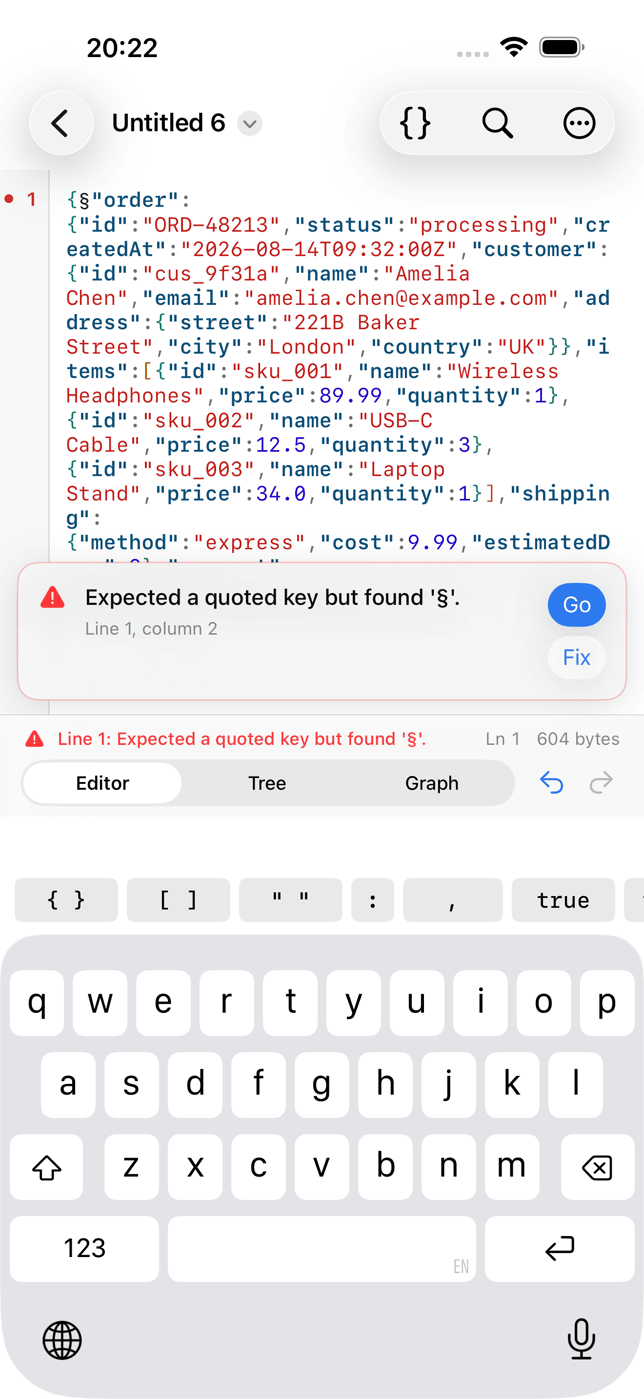
Names a JSON error in plain words with its line and column, jumps to it, and repairs comments, trailing commas, single quotes and unquoted keys in one tap.
What it doesNot breaking it in the first place
Nearly every invalid JSON file in the wild was written by hand or assembled
with string concatenation. Generate JSON with a serialiser (json.dumps,
JSON.stringify, JSONEncoder), and validate hand-edited files before
committing them. A pre-commit hook running jq . file.json > /dev/null
catches all of the above before anyone else sees it.