
Upload a CSV to ChatGPT, Claude or Gemini and ask it a question. That is the whole method, it works, and for most files it is the right answer. Two things are worth knowing before you do it with anything that matters: the whole file leaves your device, and the number you get back is only as good as whether the model ran code to get it.
The fast answer
- Non-sensitive file, real analysis: upload it to ChatGPT, Claude or Gemini and ask. Then check the answer against one number you already know.
- Customer, payroll or bank data: don't upload the rows. Use a tool that sends the AI only your column names, gets a query back, and runs it locally.
- You want the exact number, every time: skip the chat and ask SQL. AI is good at writing the query; it is the query that is reliable.
How the chat assistants actually read a CSV
There are two very different things a chatbot can do with your file, and the interface doesn't always tell you which one happened.
It runs code. ChatGPT, Claude and Gemini can all write a short program (usually Python with pandas), execute it against the file in a sandbox, and report the result. When this happens, a sum is a real sum over every row. You'll usually see the code, or a "thinking" or "analysis" step you can expand.
It reads the text. The CSV is pasted into the conversation as text and the model answers from what it "sees". This is fine for "what are the columns" or "describe this data". It is not fine for "what's the total revenue", because a language model asked to add up 4,000 numbers in its head will produce a number, confidently, and it will be wrong.
The one rule: for any number you intend to use, ask the assistant to show the code it ran. If there is no code, there was no calculation.
Large files make the second case more likely. A file too big for the model's context gets truncated or sampled when read as text, and the answer is then about the part it saw.
The three big assistants, briefly
| How to use it | Good at | Watch for | |
|---|---|---|---|
| ChatGPT | Attach the CSV and ask | Charts, pivots, cleaning, then handing back a new file | File size caps on spreadsheets; check the code ran |
| Claude | Attach the CSV and ask | Explaining what's in an unfamiliar file, careful reasoning | Same: ask for the analysis to be run, not estimated |
| Gemini in Google Sheets | Open the CSV in Sheets, use the Gemini side panel | Data already in Sheets; formulas you can keep | Sheets' own 10 million cell limit applies first |
All three change their limits often enough that any number printed here would be stale by next quarter. The pattern doesn't change: ask, then verify.
Prompts that work
Vague questions get vague answers. Name the columns and the operation:
- "Using the
amountandcategorycolumns, total amount per category, sorted highest first. Show the code." - "How many rows have an empty
email? List the first tenids." - "Plot monthly totals of
amountbyorder_dateas a line chart." - "Before answering anything, tell me how many rows and columns you loaded."
That last one is the most useful sentence in this guide. If the row count it reports isn't the row count of your file, nothing it says afterwards is about your file.
What leaves your device
Uploading a CSV to a chat assistant sends every cell to the provider's servers. Whether it is kept, and whether it is used for training, depends on your plan and your settings, and is a question for the provider's privacy page rather than this one.
For a public dataset, that doesn't matter. For a CRM export, a payroll file, a bank statement or anything with personal data in it, it is often not your decision to make: your employer's policy, or the law where you live, may already have made it.
Asking without uploading the rows
There is a second way to put AI on a CSV, and it is the one to use when the data is private: send the AI the shape of the file, not its contents.
- The AI gets your question and the column names, nothing else.
- It writes a query, usually SQL.
- The query runs on your machine, against your file.
The model never sees a value, so it can't leak one, and it can't do arithmetic badly in its head either, because the arithmetic is done by a query engine. You can do this by hand with any chatbot: paste only the header row, ask for a DuckDB query, and run it yourself. The SQL on a CSV guide shows how.
On a phone, that is exactly how Smart CSV Viewer's assistant works. You type the question; only the question and the column names go to the server; the filter it sends back runs on the phone, and you see the matching rows before anything is applied to the table.
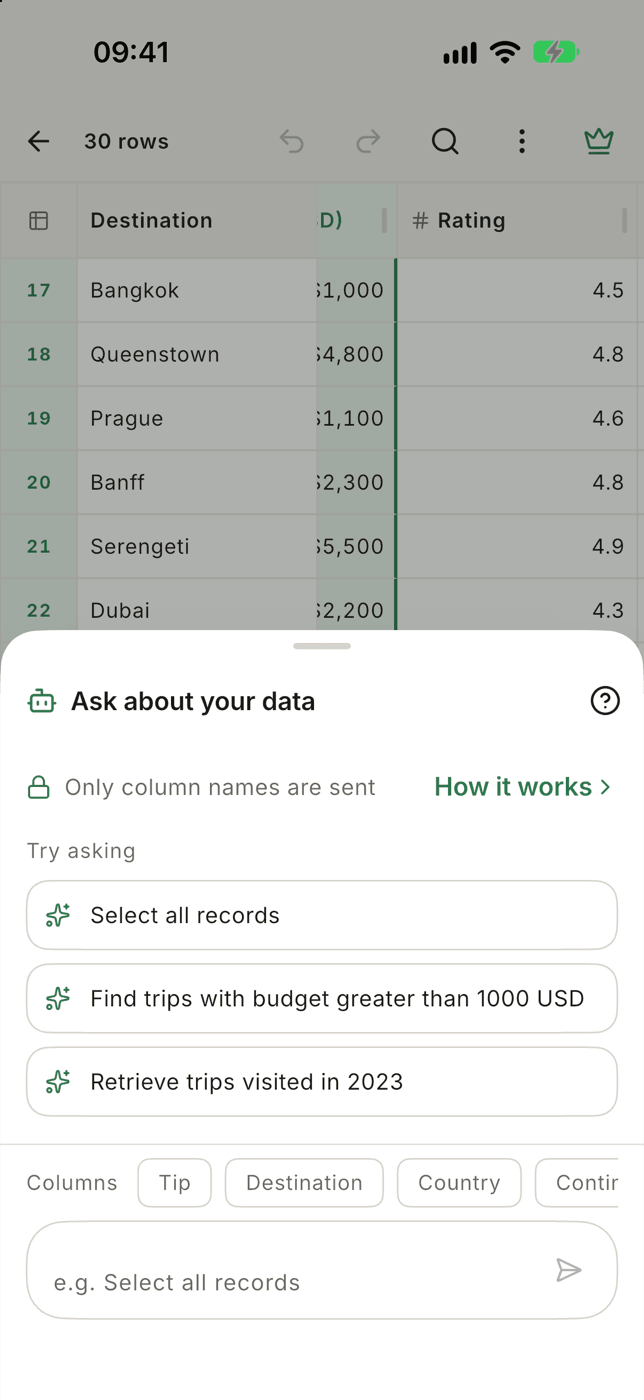
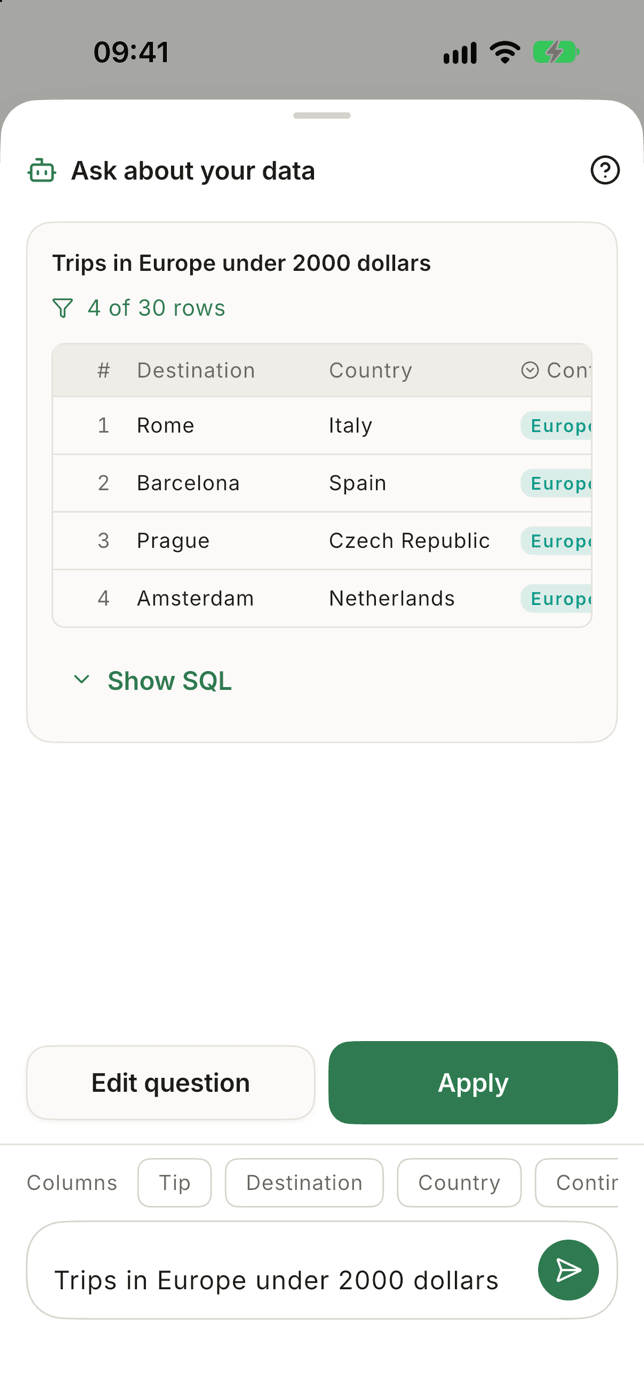
Show SQL on the answer card shows the query it ran, which is the "show the code" rule from earlier, built in.
Ask about a CSV in plain words on iPhone or Android. Only your question and column names leave the phone; the filter runs locally, with the SQL one tap away.
What it doesWhat it is not: a report writer. It finds, filters and orders rows. For "summarise this file in three paragraphs" you want a chat assistant, and the upload that comes with it.
Checking any AI answer in thirty seconds
Whatever tool you use, before you paste an AI's number into a slide:
- Row count. Does it match the file? (
wc -lon a desktop, or the count your viewer shows.) - One known total. Pick a figure you can verify another way, such as last month's revenue from your dashboard, and ask for it. If that's wrong, the others are too.
- The filter. For "how many customers in Germany", look at the condition
it used.
country = 'Germany'missesDE,germanyandGermanywith a trailing space. AI writes the obvious query; your data is rarely obvious.
When AI is the wrong tool
- Repeated reports. If you ask the same question every Monday, write the query once and save it. A chatbot gives a slightly different answer each time, by design.
- Huge files. Past a few hundred megabytes, uploading is the slow part. A local engine like DuckDB will answer before the upload finishes. See how to open a 1GB CSV file.
- The data is wrong. No assistant will tell you that half your dates are
in
MM/DDand half inDD/MMunless you ask. Look at the file first.